
My implementation
this week i made another python script, to hide the message in pictures i chose the LBS method borrowing the two least significant bits of some pixel colors to hide part of a ASCII character on them.
The hexadecimal representation of a color is a representation where every two hexadecimal numbers represent a intensity of the RGB colors Red, Green and Blue. Alternating the intensity of this colors we can obtain a complete set of most important colors.
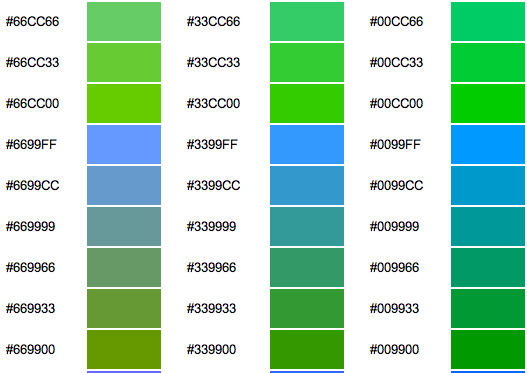
[Image obtained from:"http://www.leapcms.com/images/hex-colours.jpg"]
To hide a single character on ASCII representation the i need at least eight bits because exist 128 characters on ASCII characters so i take the next seven bits of the hexadecimal color transformed to binary number where the bits with "1" are the borrowed bits.
RED GREEN BLUE
00000111 00000011 00000011
It works because the change of these bits for a bits of a different characthers representation is imperceptible to the human eye.
The next image is one of the three lolcats with a hidden message and shows the noise of the least two bits of the red color. As we see there is a lot of noise and there is no easy way to notice patterns in the pixel shades.

My code
Enlace para descargar
http://dl.dropbox.com/u/20770926/image.py
Comando para esconder mensaje en imagen en linux
python image.py -mix nombre_imagen.png archivo_de_entrada.txt
Comando para separar mensaje de imagen en linux
python image.py -separate nombre_imagen.png archivo_de_salida.txt
Image.py
#!/usr/bin/python
from PIL import Image
import sys

image = []

def bin_text(n, digits):
    temp = bin(n)[2:]
    for i in range(digits-len(temp)):
        temp = "0" + temp
    return temp

def break_char(c):#char
    total_bits = 7

    c = bin(ord(c))[2:]
    for i in range(total_bits-len(c)):
        c = "0"+c
    return [c[:3], c[3:5],c[5:]]

def build_char(c):
    return chr(int(c,2))

def get_data(datafile):
    fl = open(datafile, "r")
    data = fl.read()
    fl.close()

    temp = []
    for i in data:
        temp.append(break_char(i))

    return temp

def mix_data(colors, data):
        R = (colors[0]&int( ("11111000"), 2))
        R = (R|int( (data[0]), 2))

        G = (colors[1]&int( ("11111001"), 2))
        G = (G|int( (data[1]+"0"), 2))

        B = (colors[2]&int( ("11111001"), 2))
        B = (B|int( (data[2]+"0"), 2))

        return (R, G, B)

def merge(picture, datafile):

    print "Abierndo archivo..."
    data = get_data(datafile)

    print "Abriendo imagen..."
    image = Image.open(picture)
    pic = image.load()

    total_pixel = image.size[0]*image.size[1]

    if (total_pixel) < len(data):
        print "Archivo demasiado grande para la imagen"
        sys.exit(0)

    len_data = bin_text(len(data), 21)

    len_data = [ [len_data[:3], len_data[3:5],len_data[5:7]], [len_data[7:10], len_data[10:12],len_data[12:14]], [len_data[14:17], len_data[17:19],len_data[19:]] ]

    for h in range(3):
        i = h%image.size[0]
        j = int(h/image.size[0])
        pic[i,j] = mix_data(pic[i,j], len_data[h])


    print "Anadiendo ", len(data), "caracteres..."
    for h in range(3, len(data)):

        position = ( (3*(len(data)+h+(total_pixel%100))) + 4 )% total_pixel

        i = position%image.size[0]
        j = int(position/image.size[0])

        pic[i,j] = mix_data(pic[i,j], data[h])

    image.save(r"modified_"+picture+".bmp", "BMP")
    print "Datos agregados a la imagen."

def separate(picture, outputFile="output"):
    print "Abriendo imagen..."
    image = Image.open(picture)
    pic = image.load()

    total_pixel = image.size[0]*image.size[1]

    fl = open(outputFile,"w")

    len_fl = ""
    for h in range(3):
        i = h%image.size[0]
        j = int(h/image.size[0])

        (R, G, B) = pic[i,j]
        R = bin_text(R, 8)
        G = bin_text(G, 8)
        B = bin_text(B, 8)
        len_fl += R[5:]+G[5:7]+B[5:7]

    len_fl = int(len_fl, 2)

    print "Obteniendo ", len_fl, " caracteres..."
    for h in range(3, len_fl):
        position = ( (3*(len_fl+h+(total_pixel%100))) + 4 )% total_pixel

        i = position%image.size[0]
        j = int(position/image.size[0])

        (R, G, B) = pic[i,j]

        R = bin_text(R, 8)
        G = bin_text(G, 8)
        B = bin_text(B, 8)

        char = chr(int(R[5:]+G[5:7]+B[5:7] , 2))
        fl.write( char)

    fl.close()
    print "Caracteres obtenidos"


def main():
    if len(sys.argv) > 0:
        if sys.argv[1] == "-mix":
            # Nombre de la imagen, nombre del archivo a mezclar
            merge(sys.argv[2], sys.argv[3])
        elif sys.argv[1] == "-separate":
            separate(sys.argv[2], sys.argv[3])

main()
The Result
Next this are the three images with the source code shown above hidden in it's pixels hiding it using the same code.
Original image 01
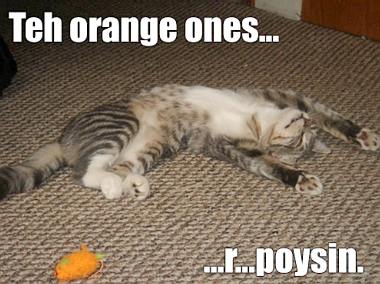
[image obtained from:"http://www.netlingo.com/imagearchive/5338_lolcat_word_large.jpg"]
Same image with hidden message

Original image 05

[image obtained from:"http://www.myspacefx.net/graphics/cat/Funny_Graphics_and_Pics/lol-cats_gheck-out-my-guns.jpg"]
Same image with hidden message

Original image 06

[image obtained from:"http://images.sodahead.com/polls/000445149/polls_lol_cats_2_final_4936_632409_poll_xlarge.jpeg"]
Same image with hidden message

The other original images were obtain from this links
http://stuffpoint.com/lol-cats/image/28755-lol-cats-ikea-cat.jpg
http://legacy-cdn.smosh.com/smosh-pit/122010/lolcat-dumbledore-is-gay.jpg
https://i.chzbgr.com/completestore/12/10/19/fOLZEL9Z_UWpweSNH_gIMQ2.png
And for last this is part of the content of the output file result of separate the hidden message of the above images to demonstrate that it works:
usr/bin/python
from PIL import Image
import sys

image = []

def bin_text(n, digits):
    temp = bin(n)[2:]
    for i in range(digits-len(temp)):
        temp = "0" + temp
    return temp

def break_char(c):#char
    total_bits = 7

    c = bin(ord(c))[2:]
    for i in range(total_bits-len(c)):
        c = "0"+c
    return [c[:3], c[3:5],c[5:]]

...
References:
http://www.strangehorizons.com/2001/20011008/steganography.shtml
http://en.wikipedia.org/wiki/Steganography
http://www.garykessler.net/library/steganography.html


Muy bien. Además semihackeaste a varios. Van 10+1.
ResponderBorrar